
OLKIL AI is officially coming to Visual Studio Code.
Today, we’re excited to launch the OLKIL AI Extension for VS Code, bringing AI-powered coding assistance and AI agent capabilities directly into one of the most widely used code editors in the world.
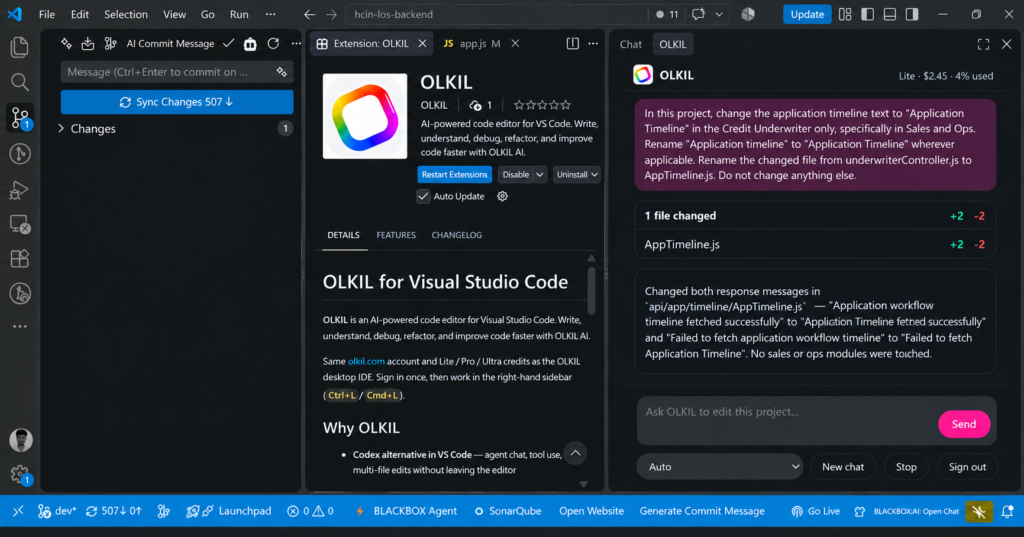
Developers can now use OLKIL directly inside their existing VS Code workflow to write code, understand projects, fix bugs, refactor code, and work on development tasks with AI.
A New Way to Code With AI in VS Code
AI is changing the way developers build software.
But developers don’t always want to leave their favorite code editor and move between different applications just to use AI.
That’s why we built the OLKIL AI Extension for VS Code.
With OLKIL installed in Visual Studio Code, developers can access AI-powered coding assistance directly inside their development environment.
You can continue using your existing VS Code setup while adding OLKIL’s AI capabilities to your workflow.
What Is the OLKIL AI Extension?
The OLKIL AI Extension is an AI-powered coding assistant and coding agent for Visual Studio Code.
It is designed to help developers with real development tasks instead of simply generating small code snippets.
You can use OLKIL to:
- Generate code
- Understand existing code
- Explain files and functions
- Find and fix bugs
- Refactor code
- Work with multiple files
- Ask questions about your project
- Build features using natural-language instructions
- Get AI assistance during development
The goal is simple:
Give developers a powerful AI assistant without forcing them to leave VS Code.
AI Coding Assistant for Visual Studio Code
Whether you’re building a website, SaaS application, API, mobile backend, dashboard, or large software project, OLKIL can help you throughout the development process.
Instead of manually searching for solutions, copying code from different websites, or switching between your editor and an AI chatbot, you can interact with OLKIL directly from your coding environment.
For example, you can ask OLKIL to:
“Explain how authentication works in this project.”
Or:
“Find the cause of this error and suggest a fix.”
Or:
“Add this feature and update the related files.”
This makes AI a more natural part of your everyday development workflow.
From AI Chat to AI Coding Agent
OLKIL isn’t focused only on AI chat.
The extension is built around an AI coding agent workflow, where you can describe a development task in natural language and let AI assist you with the work.
Instead of asking AI only:
“Write this function.”
You can give it a broader development task such as:
“Add user authentication to this application and update the relevant components.”
This agent-based approach can make AI much more useful when working on real software projects.
Keep Using VS Code. Add OLKIL.
One of the biggest advantages of the new OLKIL extension is that you don’t need to completely change your development environment.
You can keep using:
- VS Code
- Your existing projects
- Git and GitHub
- Your favorite VS Code extensions
- Terminal
- Debugging tools
- Themes
- Programming languages
- Your current development workflow
And simply add OLKIL on top of it.
Your editor stays the same. Your coding workflow gets smarter.
Built for Real Developers
OLKIL is designed for developers who work on real projects—not just simple code-generation experiments.
Whether you’re working with JavaScript, TypeScript, React, Node.js, Python, HTML, CSS, APIs, databases, or modern web applications, OLKIL can help you understand and work with your code.
From a small personal project to a growing application, the goal is to make development faster and easier with AI.
Why We Built the OLKIL VS Code Extension
OLKIL already provides an AI-powered development environment, but we know that many developers have already built their workflow around VS Code.
We didn’t want developers to choose between their existing workflow and AI.
So instead of asking developers to completely switch editors, we’re bringing OLKIL directly to them.
The new extension makes it easier for VS Code users to start using OLKIL without changing the way they already work.
What Can You Do With OLKIL?
Here are some of the ways developers can use the OLKIL AI Extension:
Write Code Faster
Describe what you want to build and let AI help generate the required code.
Understand Existing Projects
Working on an unfamiliar codebase? Ask OLKIL to explain files, functions, components, and project logic.
Debug Problems
Give OLKIL an error or development problem and use AI to investigate possible causes and solutions.
Refactor Code
Ask OLKIL to improve existing code, restructure components, or make changes across your project.
Build Features With Natural Language
Describe the feature you want to add instead of manually figuring out every implementation step.
Work With Your Codebase
Use AI with your project context to make development assistance more relevant to the code you’re actually working on.
OLKIL Is Built for the Future of AI-Powered Development
The way developers build software is changing.
AI coding assistants are becoming more than autocomplete tools. The next generation of development tools will help developers understand projects, plan changes, write code, debug problems, test applications, and complete larger development tasks.
That’s the direction OLKIL is building toward.
With the launch of the OLKIL AI Extension for VS Code, we’re taking another step toward making powerful AI development tools accessible directly inside the environments developers already use.
How to Get the OLKIL AI Extension
Getting started is simple.
Open Visual Studio Code and open the Extensions marketplace.
Search for:
OLKIL AI
Find the official OLKIL extension and install it.
Once installed, you can start using OLKIL directly inside VS Code.
The OLKIL AI Extension Is Here
Today marks an important step for OLKIL.
The OLKIL AI Extension for VS Code brings AI-powered coding assistance and agent-based development directly to VS Code users.
We’re building OLKIL with one goal in mind:
Make software development faster, smarter, and more accessible with AI.
If you’re a developer already using Visual Studio Code and want to bring AI directly into your coding workflow, give the new OLKIL AI Extension a try.
Install OLKIL AI for VS Code and start building with AI today.
SEO Keywords
OLKIL AI Extension, OLKIL VS Code Extension, OLKIL for VS Code, AI extension for VS Code, AI coding assistant for VS Code, AI coding agent for VS Code, AI coding assistant, AI coding agent, AI code editor, Visual Studio Code AI extension, AI programming assistant, AI developer tool, AI code generation, AI coding tools
SEO Meta Title
OLKIL AI Extension for VS Code – AI Coding Assistant & Agent
SEO Meta Description
OLKIL AI Extension is now available for VS Code. Get an AI coding assistant and coding agent to write, understand, debug, refactor, and build software faster.


