
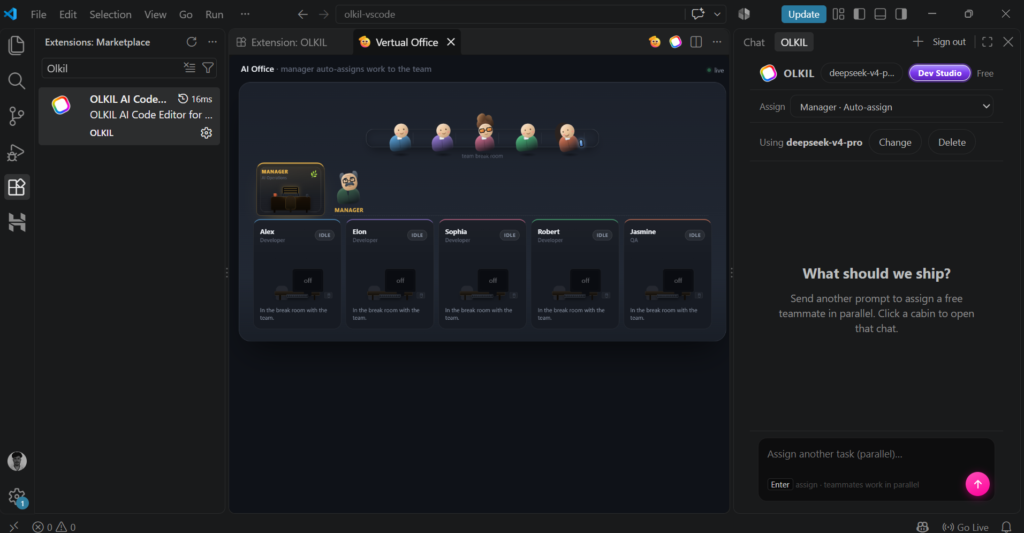
We’re excited to introduce one of the biggest updates to the OLKIL AI Code Editor VS Code Extension—Virtual Office is now live.
Instead of waiting for one AI task to finish before starting another, you can now run multiple tasks in parallel with a team of AI employees working together. This makes coding workflows faster, smoother, and much more productive, especially when you’re working on larger projects.
What Is Virtual Office?
Virtual Office is a workspace where multiple AI employees can work on different tasks at the same time. Think of it like having a small development team inside your VS Code editor.
One AI employee can analyze your codebase, another can fix bugs, another can write documentation, and another can generate new features—all running in parallel instead of one after another.
This means less waiting and more building.
Why We Built It
Most AI coding assistants are limited to a single conversation or a single task at a time. As projects become larger, constantly switching between tasks slows down development.
We wanted to create an experience where developers can delegate work across multiple AI employees without interrupting their workflow.
With Virtual Office, your editor becomes more than just an AI assistant—it becomes a collaborative workspace where multiple AI workers can help you complete complex tasks faster.
What You Can Do
Here are a few examples of how developers can use Virtual Office:
- Run bug fixing while another AI reviews your code.
- Generate documentation as features are being built.
- Refactor existing files while another employee writes new components.
- Research a codebase while another AI explains specific functions.
- Handle multiple development tasks without constantly switching conversations.
Everything happens inside your VS Code workflow, making it easy to manage several tasks at once.
The Results Have Been Surprisingly Accurate
One of the most exciting parts of testing Virtual Office has been the quality of the results.
Developers who have tried the feature have been impressed by how accurately the AI employees handle different responsibilities in parallel. Watching multiple AI workers collaborate inside VS Code feels surprisingly smooth and productive.
The experience is genuinely exciting, especially for developers who work across multiple files and complex codebases every day.
Built for Real Developer Workflows
Virtual Office is designed for practical development, not just simple demos.
Whether you’re building a personal project, contributing to an open-source repository, or working on a production application, parallel AI collaboration can help reduce repetitive work and speed up development without changing the way you already use VS Code.
Try Virtual Office Today
The Virtual Office feature is now available in the OLKIL AI Code Editor VS Code Extension.
If you’ve been looking for a smarter way to work with AI inside VS Code, this update is worth trying. Instead of relying on a single AI assistant, you can now let multiple AI employees work together, helping you build faster while keeping your workflow organized inside one editor.
We’re excited to see what developers create with Virtual Office, and this is just the beginning of what’s coming next for OLKIL.