
What if working with AI developers didn’t feel like using a chatbot?
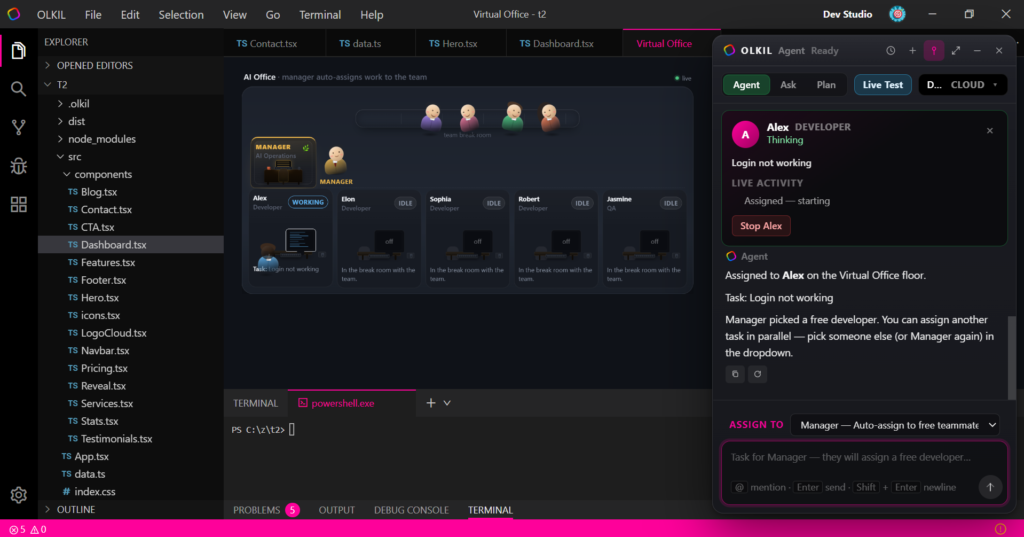
What if you could actually see your AI team working inside an office?
That’s the idea behind Olkil Virtual Office—a visual, animated workspace designed to make AI-powered development feel more like managing a real software team.
Instead of having everything happen inside a single chat window, Olkil gives you an entire animated office in one tab, where a manager and multiple AI employees work on your development tasks.
Meet Your Virtual Team
The Virtual Office includes six characters:
- Manager — coordinates and assigns tasks
- LX
- Elon
- Sofia
- Robert
- Jasmine
There is one manager and five employees.
The interesting part is that these aren’t just visual characters. They represent the workflow of your AI development team.
Give a Task to the Manager
On the left side of the Virtual Office, you’ll find the chat panel with a dropdown where you can select who should receive your task.
If you select Manager and enter a task, the task first goes into the manager’s task bucket.
The manager then determines which employee is suitable for that task and assigns it automatically.
But instead of this happening invisibly in the background, you can actually watch it happen inside the office.
The manager gets up from their cabin, walks toward the selected employee, and assigns the task.
The employee then moves toward their own cabin and starts working.
Multiple Tasks Can Run in Parallel
This is where the Virtual Office becomes especially interesting.
Suppose LX is already working on your first task.
You submit another task to the manager.
The manager can assign the new task to another available employee, such as Elon.
Now you can visually see:
LX → Working on Task 1
Elon → Working on Task 2
Then another task can be assigned to Sofia, followed by Robert or Jasmine.
Instead of waiting for one AI interaction to finish before starting another, the office visually represents multiple ongoing tasks.
Directly Assign Tasks Too
The manager isn’t the only way to assign work.
The Virtual Office also allows you to select an individual employee directly from the dropdown and assign a task to them.
This gives you two different workflows:
Manager Mode:
Give the task to the manager → manager decides who should handle it.
Direct Assignment:
Choose an employee yourself → send the task directly to that employee.
This makes the Virtual Office flexible for both automated task delegation and manual control.
Why We Built It This Way
Most AI development tools show progress through text, status messages, or loading indicators.
Olkil takes a different approach.
We wanted AI development to feel visible, interactive, and alive.
Instead of simply seeing:
“Task assigned.”
you can watch the manager leave the cabin, walk to an employee, assign the task, and see that employee start working.
The office becomes a visual representation of what’s happening behind the scenes.
More Than an Animation
The Virtual Office isn’t just a decorative animation.
The animation represents the actual task workflow:
Task → Manager → Employee → Work
And when multiple tasks are submitted:
Task 1 → Alex
Task 2 → Elon
Task 3 → Sofia
Task 4 → Robert
The office can visually represent these activities at the same time.
A Different Way to Experience AI Development
Olkil Virtual Office is our attempt to make AI-assisted development feel less like interacting with a machine and more like working with a virtual software team.
You don’t just submit tasks and wait for a response.
You can see the workflow unfold.
The manager coordinates.
The employees receive their tasks.
The developers move to their cabins.
And the work begins.
This is the idea behind Olkil Virtual Office: turning AI development into a workspace you can actually see.


